API Keys
API keys are programmatic access credentials for the Firetiger API. They’re used to authenticate API calls like triggering Agents via webhook, listing resources, or integrating with external systems.
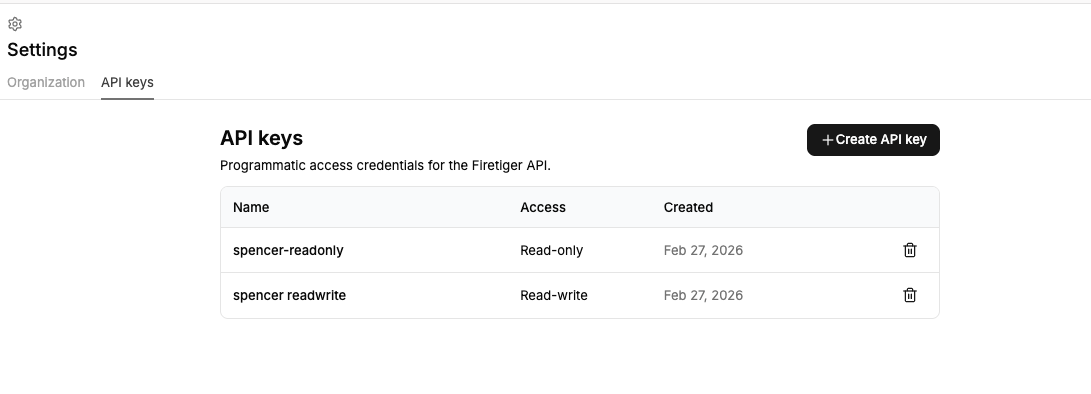
You can manage your API keys at Settings > API keys:
Creating an API key
Click + Create API key to create a new credential. You’ll be asked to provide:
- Name — a label to help you remember what this key is for (e.g.
ci-deploy-trigger,datadog-forwarder). - Access level — either Read-only or Read-write. Use read-only keys when possible to limit the blast radius of a leaked credential.
After creation, the secret value is shown once. Copy it and store it securely — you won’t be able to see it again.
Access levels
| Level | Can do |
|---|---|
| Read-only | List resources, read agent results |
| Read-write | Everything above, plus trigger agents via webhook, create and modify resources |
Using an API key
API keys authenticate with HTTP Basic auth. When you create a key, the dialog provides a username, password, and a pre-computed Authorization header value you can use directly:
Authorization: Basic <base64-encoded credentials>
For example, to trigger an agent via webhook:
curl -X POST "https://api.ft-baseten-development.firetigerapi.com/firetiger.agents.v1.AgentsService/TriggerAgent" \
  -u "username:password" \
  -H "Content-Type: application/json" \
  -d '{"name": "agents/your-agent-id", "message": "deploy completed"}'
Revoking an API key
Click the trash icon next to any key to revoke it. Revocation is immediate — any requests using that key will start failing right away.